|
Take advantage of the huge benefits of shopping by credit card, safe, convenient and reliable.
Credit Card minimum order is AUD$ 20.00 USD$ 20.00 APPROX excluding freight and GST
    

Another Unique Unitech Electronics Service !
A LEGACY PAGE
Last updated May 26th 2002 - There will be no further updates of this page
The information contained herein is as a guide only PLEASE READ THE IDE NOTICE BELOW.
HARD DRIVE INFO - Current from Updated January 17th 2002 - This page will not be updated.

So, You have just purchased a new Hard drive and do not know how to set it up .
All drives Purchased from Unitech Electronics come with the fully stated and implied manufacturers warranty,
plus a Unitech Electronics warranty certificate of stating that they are in fact " New goods " from the recognised
distributor/supplier/manufacturer, your guarantee of total quality and each drive setup by us comes with its own
a full Drive parameters sheet, before we commence here let's note one thing , always write down any changes.
|
|---|

|
In the case of all IDE Drives, we pre-format them to AMIGA specifications with a realistic sized Boot partition,
all part of the service, you expect from the Unitech Team !
OK....back to setting up...There is some vital information that we do suggest that you read FIRST OF ALL.
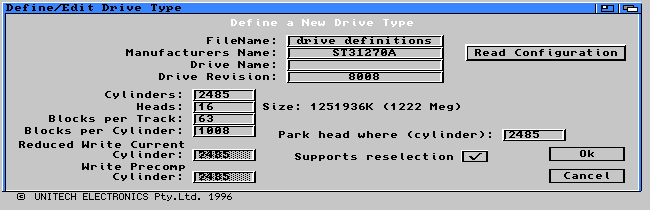
To find out what your drive's geometry or parameters are, simply "click on" the DH0 drawer, locate tools and
"click on" that drawer, find the HDToolbox icon and simply click into HDtoolbox, select the "Change Drive type"
gadget, then click on the " Define new......" gadget and you will get the screen as below , click on the
"read configuration" gadget , this will display the parameters of the hard drive for you, then you can enter
in the Manufacturer's NAME in this line if you wish ( in this example, it is a SEAGATE 1.27 GB ), after this click
on O.K. and OK for the next screen too, ALWAYS Remember to cautiously " SAVE THE CHANGES !"
Make it a good habit to write down everything you change, it may assist you in retrieving a virus damaged H.D.
|
|---|
Shown below is for Amiga OS 3.1
Shown below is for Amiga OS 3.9
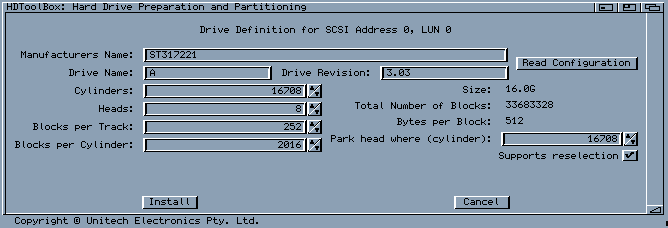
The OS 3.9 example above is for a Seagate 17 Gigabyte IDE hard drive. Actual size after set up partitioning
is 16mb, 1 GB approximately is used for "house-keeping" of files and directories as well as the RDB
( rigid disk block ). The IBM compatible equivalent is the BAM or Block Allocation Map.
This drive shown here is partitioned as 29 partitions, mostly 650MB which fits nicely on a CD for backup
purposes, you may wish to work out your own sizes. It is said that each partition loses 25K of ram to operate
within AmigaDos. The " boot " partition is called DH0, "D" as in Drive , "H" as in Hard, "0" is for the first
real number and as it is the first partition, counting starts at "0". 620MB was selected to fit onto backup CDs.
In some poorer educational establishments, it is taught to count 1 to 10, leaving out on "0" which is in fact a
numerical real mathematical number, Zero ( 0 ) is a real number just ask any scientist or mathematician.
|
|---|
Shown below is for Amiga OS 3.1
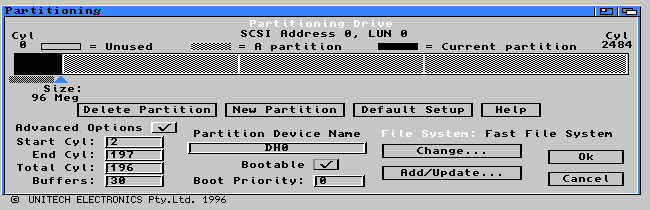
The example above is for a Seagate 1.27 GigaByte IDE hard drive. It is partitioned under OS 3.1 in only 4
partitions, you may wish to work out your own sizes. As mentioned above, it is said that a partition looses
25K of ram to operate within AmigaDos. As mentioned, The "boot" partition is called DH0, "D" as in Drive ,
"H" as in Hard , "0" is for the first real number and as it is the first partition, counting starts at "0".
|
|---|
Shown below is for Amiga OS 3.9
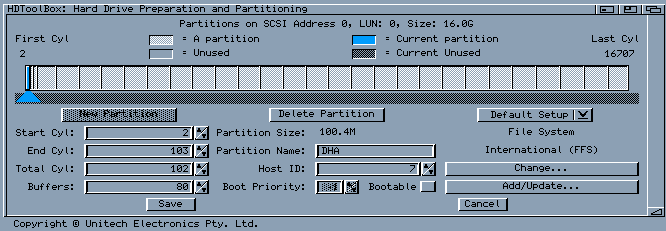
The OS 3.9 example above is for a Seagate 17 GigaByte IDE hard drive. It is partitioned under OS 3.9 in only 29
partitions, you may wish to work out your own sizes, larger or smaller, set by you. Remembering that a partition
loses 25K of ram to operate within AmigaDos. The "boot" partition is called DH0, "D" as in Drive , "H" as in
Hard , "0" is for the first real number and as it is the first partition, all counting starts at "0".
|
|---|
Shown below is for Amiga OS 3.9 - updating the file system

Shown below is for Amiga OS 3.9 - updating the system geometry
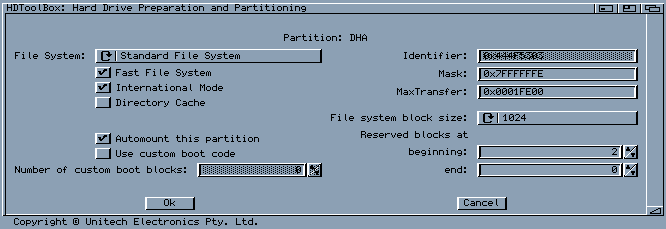
Shown below is for Amiga OS 3.9 - Identifying the drive
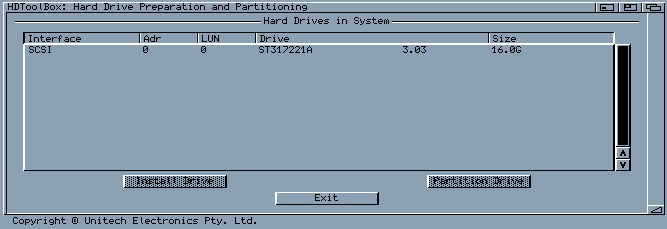
READ ME FIRST !
IDE NOTICE : *** For I.D.E. hard drive AMIGA users ONLY *** IDE NOTICE
UNDER NO CIRCUMSTANCES, DO NOT, WE REPEAT!, DO NOT EVER LOW LEVEL FORMAT IDE's.
DO NOT EVER LOW LEVEL FORMAT AN IDE HARD DRIVE , EVER !
If you have found yourself in this area, simply click on the " Don't low level format " device to exit immediately !.
DANGER !.. README !.. DANGER !.. README !.. DANGER !.. README !.. DANGER !
LOOK ! SEE! Failure to not exit at this point and the selection of "low level format" on your IDE hard drive
will result in your IDE drive being rendered as a paper weight, DON'T RISK IT , DON'T DO IT !,
low level formatting results in a useless waste of your time. The resultant hard drive due to your actions are
not covered by any warranty, our or the Manufacturers whatsoever. Try resetting it by some other method.
|
|---|
Be warned Do NOT do it !

Shown Below are the "pin-outs" of a 2.5" hard drive, A SEAGATE IDE is depicted as a reference, The general 1 to
44 pins may be standard to most mini 44 way connection hard drives, however please check with your supplier first.
Mistakes are rather costly. AVOID MAKING MISTAKES. Please note, other brands may have different
configurations to what is shown here regarding the master and slave selection setup . These are some examples.
|
|---|
Please Click here for hard drive pin out picture
Click on the " What are the 44 pins for ? " Gadget and view where they go to.

Please Click here for hard drive pin out picture
Click me to go to Mini IDE info Page
Mini 44 way IDE cables are always available from and manufactured by Unitech Electronics Pty.Ltd.
We manufacture many varieties for all varied applications. Each cable is carefully assembled,
by hand and, in the case of mini 44 going to standard 40 way, each wire is ever so carefully inserted
and crimped in place individually under strict quality control during assembly and tested prior to packaging.
|
|---|

Click here to go to Pin-outs info Page
Hard Disk tools INFO PAGE

ONLY AMIGA MAKES IT POSSIBLE
 

sales@unitechelectronics.com


|